Creates Videos from Podcasts
- C# 96.5%
- Batchfile 3.5%
| Filename | Latest commit message | Latest commit date |
|---|---|---|
| .gitea | ||
| VideoFromPodcast | ||
| .gitignore | ||
| LICENSE | ||
| README.md | ||

Podcast2Video
Creates Videos from Podcasts
Quickstart
To start running you need to do the following:
- Download dotnet-runtime if not installed already (not required on Windows) https://dotnet.microsoft.com/download
- Download ffmpeg for your platform: https://ffmpeg.org/download.html
- Download the package for your platform: https://github.com/OleAlbers/Podcast2Video/releases/
Enter the path for ffmpeg into the appsettings.json:
"Ffmpeg": {
   "Path": "D:\\ffmpeg\\ffmpeg.exe",
start using p2v via
p2v <url>
where url is the url of your rss-feed
Examples
Example for creating a complete podcast - video with default parameters:
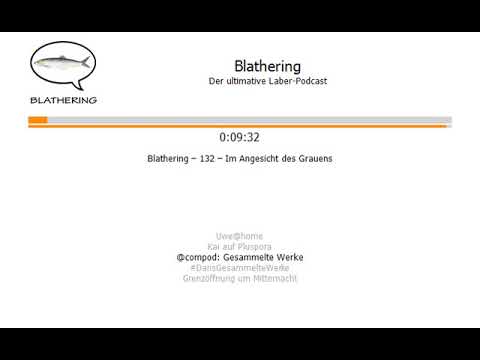
More Details
All optional parameters and information about how to modify the appearance can be found in the Wiki: https://github.com/OleAlbers/Podcast2Video/wiki